One finger, one Aviator: how Air Combat handles control
The App Store card for Air Combat - Shooting Games comes back to the same promise three times: move the plane with a single finger, shoot and avoid with a single finger, easy control with one finger. For a vertical shooter that is a real design choice, not a slogan. We spent this note on what one-finger control gives an Aviator and where it runs out.
What the listing and the frames actually show
The description says the player only touches the screen "to avoid and shoot". Read together with the features list, that means the plane follows your finger and the guns keep firing on their own. Nothing on the card mentions a fire button, a joystick or tilt control.
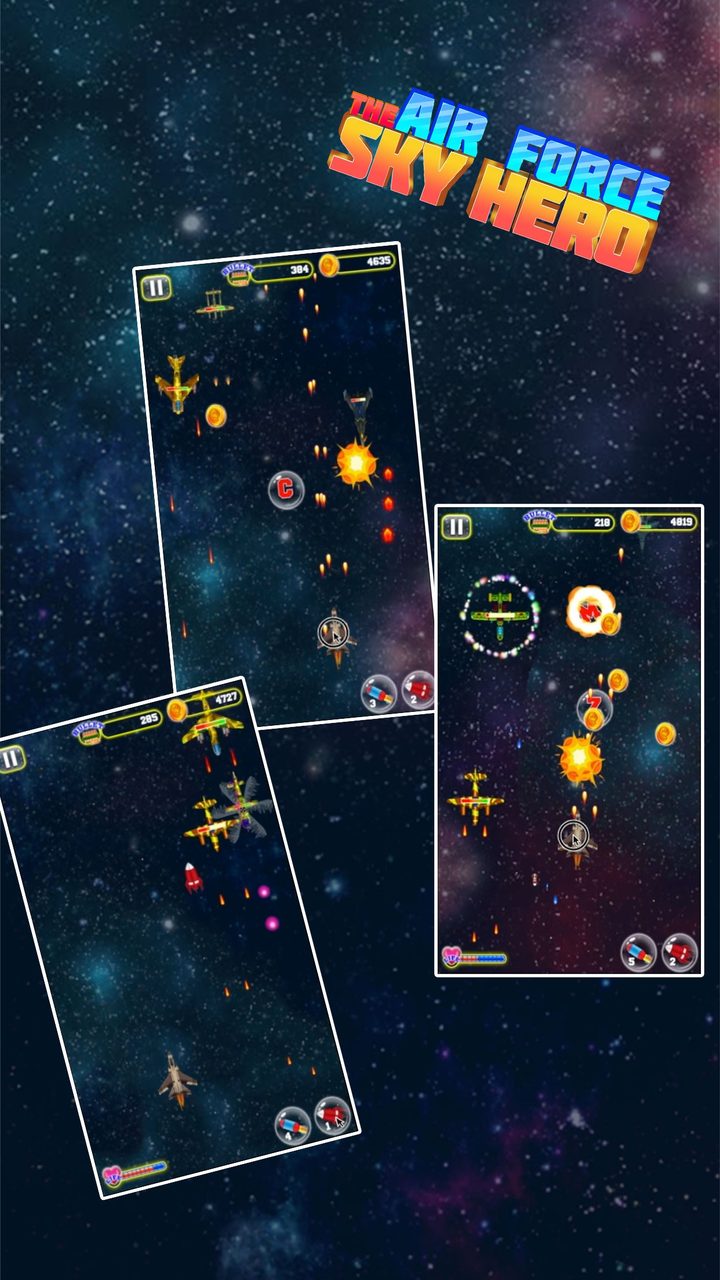
The four store screenshots match that reading. In every combat frame the bottom of the screen is empty except for the plane, a health bar in the left corner and two round buttons in the right corner, each with a small number on it. Those two buttons are the only controls we can see besides the pause button at the top left. Bullets stream upward from the plane in every frame, which fits automatic fire.
What works
-
Nothing to learn before the first sortie
With no stick to calibrate and no fire button to find, the first seconds are spent flying, not reading a tutorial. For a 4+ rated game that is the right call.
-
Precise dodging
A finger that drags the plane directly is more exact than a virtual stick, which adds a dead zone and a delay. Threading a gap in a barrage comes down to how steady your hand is.
-
Playable with one hand
The game is portrait, the controls sit under one thumb or finger, and the powers live in one corner. On a phone you can hold it and play it with the same hand.
-
Works the same on iPad
The listing marks the app as built for iPhone and iPad. Drag control scales to a bigger screen without new buttons to reach for.
Where it stops
-
Your finger covers the action
Direct drag always hides part of the screen. The usual fix is to steer from just below the plane, which most players learn in a minute, but it never fully goes away on a small phone.
-
No choice about when to fire
If firing is automatic, as the frames suggest, there is no way to hold fire or charge a shot. Depth has to come from the powers and the planes you unlock, not from the trigger.
-
Using a power means letting go
The two power buttons sit in a corner. To press one with the same finger you have to stop steering for a moment, or use a second finger. In a dense barrage that costs something.
-
No controller or Mac keyboard mapping on the card
The listing says nothing about game controllers, and on Mac the app is marked as not verified for macOS. Touch is the only control the card promises.
Who it suits
One-finger flight suits a player who wants a quick sortie on the bus, a child who should not have to learn a control scheme, and anyone who prefers dodging to button work. It suits less well someone who wants to manage fire, weapon switching and positioning separately, as in arcade shooters with full button layouts.
If you are that second kind of Aviator, read our note on the two mission types before you install: the missions decide how much the simple control is asked to carry. For practical pointers, including how we steer from below, see Tips.